

Create a Release
In order to start pushing updates, you will need to create a release.
shorebird release is a drop-in replacement for flutter build. It builds your
app and uploads the compiled Dart artifacts to Shorebird’s servers as a baseline
for future patches. After running this command, you still need to upload the
generated artifact (.aab for Android, .ipa for iOS) to the respective store.
Choose the Flutter version
Section titled “Choose the Flutter version”shorebird release builds with the newest Flutter your Shorebird version
supports (3.47.9 today), not with the flutter on your PATH, and
every patch to the release is built with that same Flutter version. If your app
uses a different Flutter version, pass --flutter-version:
See Match the Flutter version you already use and Supported Flutter versions.
Create a release for your platform
Section titled “Create a release for your platform”Create an Android release by running the following command:
shorebird release android
Example output:
If your application supports flavors or multiple release targets, you can
specify the flavor and target using the --flavor and --target options:
By default, shorebird release android builds an AppBundle (.aab). If you
would like to also generate an Android Package Kit (.apk), use the following
command:
Distribute an APK outside Google Play
Section titled “Distribute an APK outside Google Play”If you ship your app as an APK (from your own website, an MDM, or a store other
than Google Play), build the release with --artifact apk and distribute the
APK whose path shorebird release android prints at the end. Don’t distribute
an APK from flutter build apk: patches apply only to the build that Shorebird
released.
Devices that installed that APK get patches the same way as devices that installed from Google Play. The updater checks for a patch when the app starts, downloads it in the background, and applies it the next time the app starts (see When do updates happen?). Users don’t have to reinstall anything.
A patch can only change Dart code. When you change native code, add a plugin with native code, or upgrade Flutter, create a new release with a new version and send users the new APK. Shorebird doesn’t install APKs, so users still install each new release themselves, and patches for the old release don’t apply to it.
Get APKs from a Release builds APKs signed with your local Android debug key, if you have one, rather than your app’s signing key, so use those for testing only. Android won’t install one over a copy of your app signed with a different key.
Build a smaller APK for one architecture
Section titled “Build a smaller APK for one architecture”By default, shorebird release android compiles for three Android ABIs:
android-arm (32-bit ARM / armeabi-v7a), android-arm64 (arm64-v8a), and
android-x64 (x86_64). That produces a larger APK than a Flutter build that
only packages arm64-v8a.
To build for a single architecture, pass --target-platform before any --
separator:
Allowed values are android-arm, android-arm64, and android-x64. Pass the
flag more than once, or as a comma-separated list, to include extra ABIs.
Gradle NDK ABI filters (for example ndk.abiFilters) are not a substitute for
--target-platform. If Gradle omits an ABI that is still in
--target-platform, Shorebird skips that architecture instead of failing, and
the release ships with only the ABIs that actually built. Use
--target-platform to declare the architectures you want — a mismatched Gradle
filter will not error.
--target-platform is a Shorebird flag. Do not put it after -- — that
forwards it to flutter build and is not applied the same way.
shorebird patch android against a single-arch release does not need the flag.
The patch command skips architectures that were not part of the release.
Create an iOS release by running the following command:
shorebird release ios
Example output:
If your application supports flavors or multiple release targets, you can
specify the flavor and target using the --flavor and --target options:
To upload with Xcode’s Distribute App flow, see Uploading from Xcode.
If the build ends with a signing error, see Signing issues.
Create a Linux release by running the following command:
shorebird release linux
Example output:
Create a macOS release by running the following command:
shorebird release macos
Example output:
If your application supports flavors or multiple release targets, you can
specify the flavor and target using the --flavor and --target options:
To distribute the app outside the Mac App Store, see Notarize a macOS app.
Create a Windows release by running the following command:
shorebird release windows
Example output:
If your application supports flavors or multiple release targets, you can
specify the flavor and target using the --flavor and --target options:
To package this build for the Microsoft Store, set build_windows: false in the
msix_config section of pubspec.yaml so package:msix does not rebuild with
stock Flutter. See
Releasing for Windows,
which also covers other installers such as Inno Setup, WiX and NSIS.
Signing issues
Section titled “Signing issues”Depending on how you normally sign your iOS app, you may see an error at the end
of the build saying something like:
Runner.app requires a provisioning profile with ___ feature or that no signing
certificate was found. This can be addressed in a few ways:
Setting up automatic signing in Xcode
Section titled “Setting up automatic signing in Xcode”If you are releasing on your local machine (i.e., not in a CI environment), this option is easier than the following options, but does not always work well in CI environments.
In Xcode, open your project and navigate to the “Signing & Capabilities” tab. Ensure that “Automatically manage signing” is checked.
Create an ExportOptions.plist file.
Section titled “Create an ExportOptions.plist file.”You may need to provide an ExportOptions.plist file to the
shorebird release ios command. This file is used by Xcode to determine which
certificate and provisioning profile should be used to sign the .ipa. An example
of this file is:
To use this file, pass it to the shorebird release ios command:
Uploading from Xcode
Section titled “Uploading from Xcode”If you upload the archive with Xcode’s Distribute App flow, uncheck Manage Version and Build Number in the dialog. If it stays checked, Xcode rewrites the build number in the uploaded IPA, so the version that ships doesn’t match the one Shorebird recorded for the release, and patches won’t install on it. See Patches can’t install because the app isn’t the build Shorebird released.
Notarize a macOS app
Section titled “Notarize a macOS app”To distribute a macOS app outside the Mac App Store, sign it with your Developer
ID Application certificate and notarize it. Set the Release configuration in
Xcode to sign manually with that certificate before you run
shorebird release macos.
Apple’s notary service requires the hardened runtime and a secure timestamp on
every executable in the app. shorebird release macos builds the app with
flutter build macos, which signs App.framework and FlutterMacOS.framework
without a timestamp, so re-sign the app’s frameworks and then the app before you
submit it. Use the app path that shorebird release macos prints:
- Replace the app path and the signing identity with your own;
security find-identity -v -p codesigninglists the identities in your keychain. --keychain-profilenames credentials you save once withxcrun notarytool store-credentials notary, which asks for your Apple ID and an app-specific password, or an App Store Connect API key.- If a plugin bundles its own helpers (an XPC service or a helper app inside its
framework) or your app has extensions in
Contents/PlugIns, sign those too, innermost first, before the app. - If notarization fails,
xcrun notarytool log <submission id> --keychain-profile notarylists what Apple rejected.
Package the stapled app however you ship it, for example in a disk image. To do this in a fastlane lane, see fastlane.
Patches install on a re-signed app, including one Apple re-signs for the Mac App
Store, when the release was built with Shorebird 1.6.128 or newer on its default
Flutter (3.47.7 at revision 5bef02a or later, or a newer Flutter). Earlier
builds of Flutter 3.47.7 don’t have the fix. For a release built with an older
Shorebird, run shorebird upgrade and create a new release. A patch needs no
re-signing or notarization.
Options
Section titled “Options”The options covered on this page are the ones most releases need:
--flutter-version, --flavor, --target, --artifact and
--target-platform (Android), and --export-options-plist (iOS). A few others
come up often:
--build-nameand--build-numberoverride the version and build number frompubspec.yaml. See Release versions.--dry-run(-n) builds and checks the release without uploading it.--obfuscateobfuscates Dart code. Without--split-debug-info, Shorebird writes the symbols tobuild/shorebird/symbols. See Uploading Symbols.--no-codesignbuilds an iOS or macOS release without signing it, for you to sign later in Xcode.
Run shorebird release --help for every option.
Releasing for multiple platforms simultaneously
Section titled “Releasing for multiple platforms simultaneously”If your app supports multiple platforms, you can build and publish releases for
them in a single command using the --platforms (or -p) option:
This will compile the binaries for the specified platforms and register them as a single version release in your Shorebird console. Note that to release for iOS or macOS, you must run this command on macOS hardware.
Release versions
Section titled “Release versions”Shorebird identifies a release by your app’s version and build number, joined
with a +, such as 1.0.0+1. shorebird release reads them from the app it
builds: versionName and versionCode on Android, CFBundleShortVersionString
and CFBundleVersion on iOS and macOS, the executable’s product version on
Windows, and version.json in the app bundle on Linux. By default those come
from the version in your pubspec.yaml, or from --build-name and
--build-number if you pass them. Anything that sets them in the native project
overrides that: values written directly in Info.plist or build.gradle, a
flavor’s versionNameSuffix or versionCode, or a tool such as fastlane that
bumps the build number. The version that counts is the one in the build you
publish to the store.
For add-to-app, shorebird release aar and shorebird release ios-framework
don’t read a version from the build. They use --release-version, which must
match the version and build number of the host app you publish.
A patch is made for one release version. An installed app asks for patches using
the version it was built with, and gets only patches made for a release with
exactly that version on the same platform. 1.0.0+1 and 1.0.0+2 are different
releases, and a patch for one doesn’t install on the other.
This means:
-
Every build you publish to a store needs its own
shorebird release. A build with a new version or build number doesn’t receive patches made for an earlier release. When a device updates to it, the updater discards patches it downloaded for the previous version. -
Platforms with the same version share a release. Releasing Android and iOS as
1.0.0+1adds both platforms to one release. Every platform in a release must use the same Flutter version. If they don’t,shorebird releasestops and asks you to pass that release’s--flutter-versionor bump the version. -
You can’t release a version twice on the same platform. If that version is already released for the platform,
shorebird releasestops with:Increase the build number (or the version) and run
shorebird releaseagain.If an earlier run for that version stopped before it finished, running
shorebird releaseagain replaces what the earlier run uploaded, so publish the build from the last run. See Patches can’t install because the app isn’t the build Shorebird released.
To patch a specific release, see Create a Patch.
Manage releases
Section titled “Manage releases”In addition to using the Shorebird console,
you can manage your app’s releases directly from the command line using the
shorebird releases commands.
List releases
Section titled “List releases”Via the Shorebird CLI
Section titled “Via the Shorebird CLI”To list all releases associated with your app:
This lists each release’s ID, version, platforms (with each platform’s status),
and Flutter version. To see a release’s patches, use
shorebird patches list.
Via the console
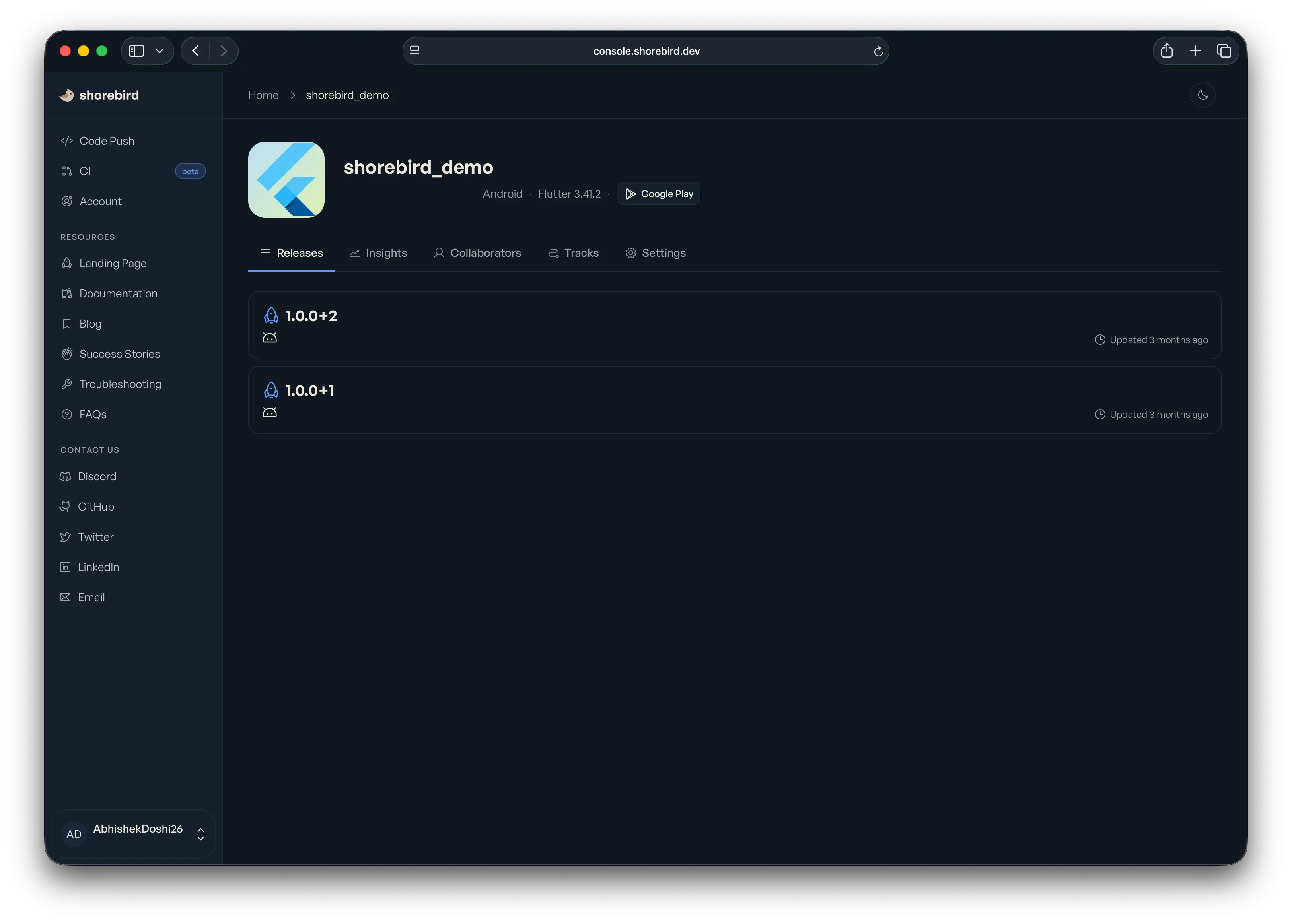
Section titled “Via the console”You can view all of your releases for your current app (as defined by your
shorebird.yaml) on the Shorebird console.
Open a release to see its patches, installs, size breakdown and notes; see
Your App in the Console.
View release details
Section titled “View release details”To view detailed information for a specific release version:
This shows the release’s ID, version, Flutter version and revision, when it was
created and last updated, any notes, and the status of each platform. It doesn’t
show patches; use shorebird patches list for
those.
Get APKs from a Release (Android only)
Section titled “Get APKs from a Release (Android only)”If you created an Android release using an App Bundle (.aab) and want to
generate local APKs from it for testing, you can download them using:
This downloads the release AAB and builds APK files locally, signed with your
local Android debug key, if you have one, rather than your app’s signing key, so
don’t distribute them. By default that produces a universal APK (every ABI
in the AAB). Pass --no-universal to extract one APK per ABI instead:
If you want a small APK at build time rather than splitting a fat AAB
afterwards, use --target-platform as described in
Build a smaller APK for one architecture.
Delete releases
Section titled “Delete releases”You can delete a release for your app (as defined by your shorebird.yaml) on
the Shorebird console.
- Navigate to the application.
- Click on the release you wish to delete.
- Go to the “Settings” tab at the top of the page.
- In the “Danger zone” there will be a “Delete” button.
In order to complete the delete request, you do need to confirm which binaries you would like to be deleted. You can easily delete all releases or pick by platform. The list of platforms shown is based on the binaries that are uploaded for that release.
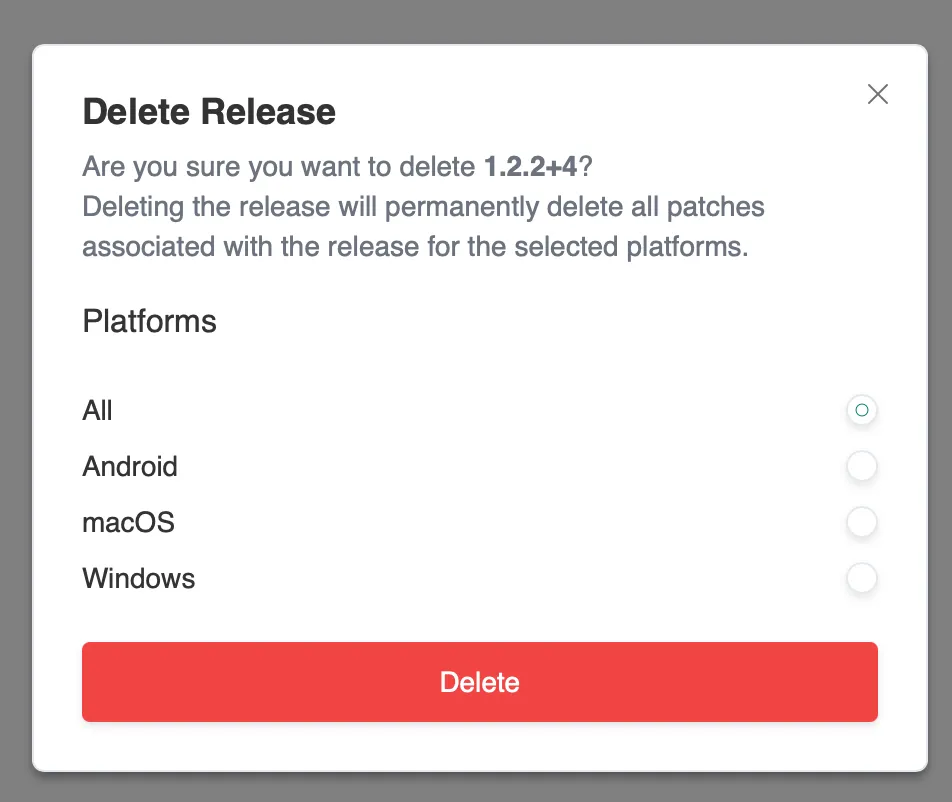
The deletion takes effect as soon as you confirm. See Delete Apps, Releases, and Patches for what is removed and for alternatives to deleting.
You can also delete a release from the command line, which is useful in scripts
that clean up test releases. Deleting a release deletes its patches, and devices
on that release get no new patches. Pass --platform to delete only one
platform’s release artifacts and patch files and keep the release. The command
asks you to confirm; pass --yes in scripts. It needs Shorebird 1.6.129 or
newer:
Run shorebird releases delete --help for all options.